
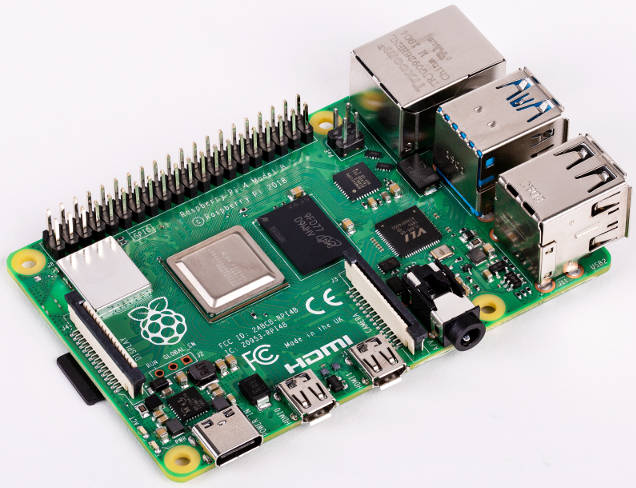
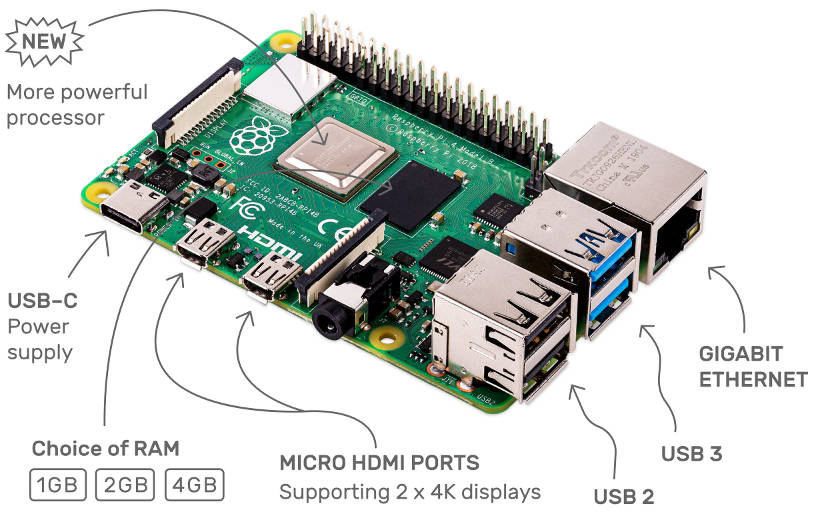
It has quad 1.5GHz Arm Cortex-A72 cores, Gbit Ethernet, 4Kp60 HEVC video decode and dual HDMI outputs to run twin 4K monitors – many of the changes have been made to improve consumer and industrial performance, without compromising its original educational role.
1, 2 and 4Gbyte variants (using LPDDR4) will be offered, with prices starting at the traditional $35, and the board size remains the same.
Looking at the specs, the Raspberry Pi 4 main chip, to be called BCM2711, has had significant changes to its peripherals as well as its core – something that hasn’t happened between earlier generations.
“It’s a pretty fundamental shake-up” Raspberry Pi Trading CEO Eben Upton told Electronics Weekly. “We’ve overhauled every aspect of the design, from the CPU and memory, to the multimedia, display output and non-multimedia IO.”
Why the move from Cortex-A53 to A72?
 “Cortex-A53 represents pretty much the limit of what you can achieve with an in-order core – A55 reportedly gives you another 10%, but nothing earth-shattering, so to get a significant performance uplift you’d either need to go to an incredible clock speed, say in the 3GHz range, or use one of the ‘large’ A7x out-of-order cores,” said Upton, who was closely involved in the architectural design of the new SoC.
Where has all the extra video performance come from – maybe Broadcom’s VideoCore V?
“This has a Broadcom VideoCore VI in it – the evolved version of VideoCore V that supports newer standards like OpenGL ES 3.2,” said Upton. “This is roughly another decade of continuous development on top of the VideoCore IV platform we used in previous products.”
Serial IO
Serial IO on the BCM2711 is far better than on earlier Pi chips.
For example, Ethernet speed used to be hampered because its connection to the main SoC had to be through an on-PCB USB port. On the Pi 4, Broadcom’s BCM54213 Gigabit Ethernet PHY has appeared, connected at full bandwidth to a MAC on the BCM2711 via a dedicated RGMII interface.
On-board wireless connections remain Wi-Fi 802.11ac and Bluetooth, although Bluetooth is now 5.0, up from 4.2.
For the first time on a Pi, two USB 3 connectors have appeared, attached to the main SoC via a single lane of PCI Express – so the total user port count is now two USB 2 and two USB 3.
Alongside this on the chip are four additional PL011 UARTs, four new SPI and four new I2C interfaces.
What has not been added is dedicated hardware support for virtualisation. “I expect that users interested in running multiple isolated virtual machine images on the device would end up using a para-virtualisation approach,” said Upton.
Some Raspberry Pi 3B+ users running sustained high processing loads across all four cores found it necessary to add a heatsink, a fan, or both to the SoC. Will Raspberry Pi 4 need a fan?
“It will benefit from a fan and/or heatsink if you want to run it flat-out for extended periods,” said Upton, “but it’s been designed to meet most user requirements – web browsing, document editing, software development, video – without throttling and without an additional thermal solution.”
The power plug is now USB-C, and the official power supply is now a 3A (5V) unit, although the existing 2.5A PSU is said to be usable “if you don’t need a full 3 amps”, according to the foundation, and it has made a $1 micro USB to USB-C adaptor available.
Industrial use
Alongside traditional educational use, more serious consumer, industrial and commercial uses are foreseen for Pi 4.
“Just as we help make coding more accessible for consumers, we also aim to democratise digital innovation in businesses and public services,” said Upton, “Today, over 50% of our $35 Raspberry Pi units are destined for industrial and commercial use. Raspberry Pi 4 builds on this, providing greatly increased performance at the same cost. We aim to provide a low-cost platform for technological innovation that is accessible to every organisation, from start-ups to multinationals.”
A Raspberry Pi 4 can serve both as an embedded controller and as a full-featured Linux workstation, according to Raspberry Pi: “For the first time it will be possible to both develop and deploy industrial IoT applications on a single common hardware platform.” With Gigabit Ethernet, 802.11ac, Bluetooth and more serial ports “it can serve as a leaf node in an IoT network, or as a data aggregator for a large network of sensors.”
Updated video performance also suits Pi 4 to dual screen digital signage and high-end thin client use.
“Bringing PC-equivalent performance to the sub-$50 price bracket, Raspberry Pi 4 is the natural choice for developing and deploying industrial IoT applications; and monitoring and control of a broad range of industrial equipment.” said Raspberry Pi, adding that “as with all Raspberry Pi products, a high level of backward compatibility facilitates migration” of existing Pi applications.
 Consumer use
With dual-screen 4K-capability and up to 4Gbyte of ram, Rasberry Pi is describing Raspberry Pi 4 as “a complete desktop computer, and the world’s most affordable multimedia PC. For the first time, it replicates the full range of capabilities of a traditional PC – from super-fast file sharing to multi-tab web browsing and sophisticated video and photo editing – all in a tiny, eco-friendly, ethically-produced package.”
“The vision behind Raspberry Pi 4 is to make a rich multimedia PC experience accessible to everyone. By offering a ‘just right’ level of performance for most users, we’ve been able to do this at roughly a tenth the cost of a traditional desktop PC” said Upton., adding: “Raspberry Pi is already the best-selling British computer of all time. In 2018 Q4 Raspberry Pi 3+ and earlier models accounted for 2.5% of the global PC market; the improved capabilities of Raspberry Pi 4 should allow us to address a much larger fraction of that market.”
Hobbyist and maker communities get access to Gigabit Ethernet and USB 3.0 connectivity. “As with all Raspberry Pi models, Raspberry Pi 4 is designed to be backwards-compatible, so that old creations will for the most part work without modification on the new device,” according to Raspberry Pi.
For programming, Raspberry Pi 4 comes with a range of programming languages, from Scratch to Python and C++.
Later today, Raspberry Pi 4 will be available from element14 and Okdo (part of RS), as well as the global network of approved resellers and from the physical Raspberry Pi store in Cambridge UK – in the Grand Arcade shopping centre.
There is an optional Desktop Kit, bundling a Raspberry Pi 4 with a mouse, keyboard, SD card, power supply, cables and case – everything needed except a monitor.
For more technical information, the Raspberry Pi Foundation blog now has Pi 4 as its top story.
BTW This article was written on a Raspberry Pi 3 Model B+ in an official Raspberry Pi case using an official Raspberry Pi keyboard/hub and mouse, all powered by a 2.5A PSU*.
All was personally purchased, except the Raspberry Pi board – both Farnell (element 14) and RS Components (Okdo) have previously kindly donated Raspberry Pi boards to Electronics Weekly.
* the official one….


Okay a month since I got mine so a few comments.
The Good
1. GCC compiler speed is amazing. Up to five times faster than a PC for the same code ! Only difference was targetting the Pi ARM processor rather than an STM ARM M series. No idea why but a great surprise.
2. More interfaces, although still multiplexed onto too few pins. Just about managing though
3. It is hot but adding a small 5V fan brought temps down to 35degC which seems much better
The Bad
1. The documentation is not perfect. In fact much of the new bits is totally missing. So don’t expect it to be as straightforward as Windows programming.
2. Browser rendering speed is poor, and seems to use far more memory than one would expect.
3. Only one I2S and no SPDIF support (which STM chips offer and would have used very little die space) so audio is still the weak link
And the Ugly
1. WiFi is utter crap. Whoever thought not using an external antenna to save on approvals time was a good idea needs a kicking. The thing is highly directional and not that sensitive so is useless for any embedded system. Nul points as they say
Yes, specifications for VideoCore VI is not released. People speculate but so far the details are under NDA.
Hi Mike and sepam.
You must have put in a lots of work Mr B.
For me, for desktop work the RP4 (4G) seems as good as a PC – although mine will be getting a fan soon, and I will miss the complete silence.
On the audio font, I have never had much luck with Raspberry Pi audio – have had superb sound through I2S and several different DACs and amplifiers, but to me the set-up hurdles were always too high, and all work gets lost after an update – although maybe things have changed now.
Hi Steve – I’m using the Pi for an audio project so I’ve no choice but to solve the audio issues. I originally had six STM32H750s which offered large numbers of audio connections but poor throughput, so now I’ve gone for the Pi doing the grunt work and a single H750 doing the real world interfacing.
And its the continuous audio processing that makes the need for a fan, but as I’ve shown, even a small and almost quiet fan can have dramatic results thanks to the heat spreader they have used. Find a 5V one that will run on 3.3V and it will be more than enough.
Haven’t experienced/suffered an update yet, but I expect in true non-Windows fashion it won’t be seamless.
Hi Mike, that is some audio project.
I tried the original Cirrus audio board by Farnell, then some by that India firm (Allo?) – v nicely made and really clever – one had FPGA-based re-timing.
But they all need special code – even if it is to toggle a single IO for switch-on mute, and it is that that get erased during an update. The only options are to compile-it-yourself (in my dreams) or await a ‘tweaked’ version from the board maker.
IQ Audio (http://iqaudio.co.uk/) makes some totally lovely stuff and is run by a very nice bloke – who knows his way around the code foibles.
Actually, it looks like IQaudio has done the right thing, and implemented the eeprom that was always supposed to go with the HAT format, so that the Pi self-configures – at last.
Regarding its Pi-DigiAMP+ : Added to that this version comes with a pre-programmed EEPROM allowing Raspbian to auto configure itself including unmoving the audio signals at startup.” and “Linux driver support already delivered within Raspbian”.
Hats of to Mr IQ
Yes I played with a Raspberry Pi when they came out and decided it was still a toy. But the Pi4 is in a different league. The 64 bit data means it can handle audio processing as well as any DSP and with the new higher speed (proper !) Ethernet I can build whole arrays of them with no blocking to handle the various audio over Ethernet protocols.
I try to avoid re-timing, especially if it’s sample rate conversion. I’d almost rather go to analogue and back again rather than do that, although I agree that’s being slightly irrational.
Hadn’t heard of IQAudio before. Seems like some good stuff, although I have an aversion to putting anything more than SPDIF bits through RCA sockets 🙂 Also surprised by their statement they use UK made PCBs as I gave up on them 20 years ago due to both cost and quality issues. This is one area where China really does excel.
I bought one of the very first Pis but it was a bit of a dog so gave it to the local school. Been looking for something with some proper processing speed for some time now and am hoping this will replace the array of STM32s I use in my current project.
Regarding flip-chip, it is used in tight situations with very expensive PCBs, but I don’t think the Pi can really be regarded as area restricted with all those connectors. And plugging into them all the time could easily break a die connection so the processor would need to be on a daughter board anyway.
I think I’ve just scrapped several months of hardward development. At that price other embedded solutions seem overpriced and underpowered !
And SEPAM, Pis are used in thousands of medium volume applications, it’s just they’ve never addressed the high or low ends. High end solved. But the Pi Zero is not the low end solution people want.
I am particularly intrigued by VideoCore VI, also spanking new. It has clearly a lot more oumph than VideoCore 4 but again details are hard to get. Instruction set architectures is a particular interest of mine, seems approach is less analytical than one might expect.
Hopefully this will be produced in vast quantities. Why then not use flip chip bonding? I am curious why this has not taken off as it was expected decades ago.
And ordered !
Me too Mr Bryant
I use a Raspberry Pi for general office work, but it sometimes slows to a crawl – I suspect when it gets to the end of the 1Gbyte memory.
To the Foundation’s credit, Raspbian always copes and is sorts it self out after a minute or so.
But more memory will make all the difference (I hope) – I don’t necessarily need the added speed.
Have you ever got one to thermal limit? I havne’t in office use, but the RP3B+ chip runs far from cool.
Hi SEPAM
Do you mean die flipped straight onto the FR4?
I would think the thermal mismatch between the die and FR4 would put a lot of strain on the solder balls/joints without something with a bit of give in between – so reliability problems in use.
Plus, the ball grid dimensions would be fairly tight.
Nice and small though.
The Raspberry Pi lot have put quite a lot of thought into packaging their SoC, as I remember. I think the first ones had stacked SoC and memory, then the next package (again, if I remember right) was designed to get more heat out and separated the memory onto the underside of the pcb. Now it looks like they have stuck with the thermally-better package, but put the memory alongside – must have been an interesting board-routing challenge to keep the number of layers down.
For small chips you can flip straight onto the FR4. For a larger chip you can use a build-up using for instance polyimide, that provides elasticity and/or better thermal match. And yes, the density is pretty high. The advantages are far higher densities, better thermal contact with substrate and supposedly cheaper for large volumes. Or at least that is what was promised all those years ago.
Yes but those promises were made before we had CSP, wafer reforming and all the other new packaging tricks.
The Broadcom chip seems a bit too big for CSP, or is it? They must have had some sizing problems since the current PCB is a tiny bit larger than earlier models.
I think the other point is that digital ICs are less I/O restricted and more heat restricted nowadays. The SoC in the Pi4 uses head spreader technology to try to remove the heat from the die, but I bet we will see all sorts of ancilliary cooling attachments needed in due course.
I see Pimoroni is already offering a fan and heatsink for Pi 4
https://shop.pimoroni.com/products/fan-shim
https://shop.pimoroni.com/products/raspberry-pi-4-heatsink
And its in-house case is pre-cut to accommodate either
My Pi 3B+ runs pretty hot, but has never throttled with normal ‘office’ use, even in its case.
I suspect you drive you processors a lot harder than this.
BTW, Pimotoni’s fan attaches in an interesting way, and is a bit more that just a fan – v neat